
Xender vs Telegram File Sharing — Which One Actually Fits Your Workflow in 2026?
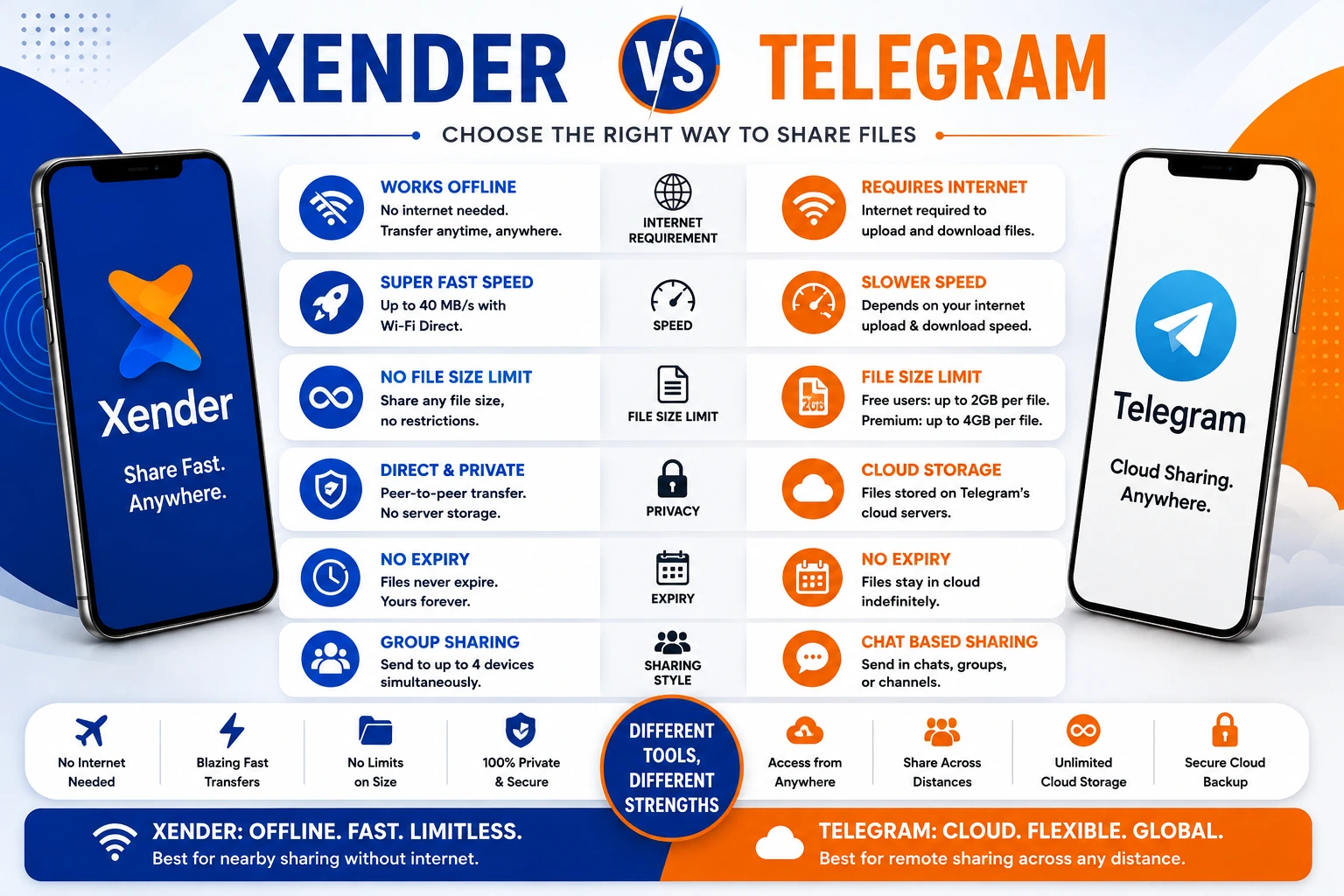
Telegram is one of the most generous messaging apps for file sharing — and that is exactly why people compare it to dedicated file transfer tools like Xender. Unlike WhatsApp, Telegram does not compress your videos. Unlike email, it does not cap you at 25MB. It stores files in the cloud indefinitely for free. These are real advantages.
But Telegram is a messaging app that supports large files. Xender is a file transfer tool built for nothing else. That difference becomes relevant the moment the file is over 2GB, the internet is slow, the recipient is sitting next to you, or both phones need to be switched.
This comparison cuts through the overlap to show exactly where each tool fits.
How Each Tool Transfers Files
Telegram
Telegram routes everything through its cloud servers — developed by Telegram FZ-LLC, founded by Pavel Durov and launched in 2013. You send a file in a chat, Telegram uploads it to its servers, and the recipient downloads it from those servers. The file stays accessible in the chat history indefinitely. Every step requires an internet connection on both ends.
Xender
Xender, developed by Xender (HK) Limited in 2013, creates a direct Wi-Fi Direct (IEEE 802.11) peer-to-peer connection between two nearby devices. Files move from storage to storage — no server, no upload, no download step, no internet required.
Same year launched—completely different architecture.
Telegram File Limits in 2026
Telegram allows free users to send files up to 2 GB each. Telegram Premium subscribers can upload files up to 4 GB each. These limits apply to various file types, including documents, videos, and media.
Unlike most platforms, Telegram gives all users 2GB file uploads for free with no paid subscription required. All files stay in Telegram’s cloud indefinitely — no storage quotas or expiration dates.
One important distinction for media files: photos and videos sent inline are compressed automatically. Always send as File/Document — never as Photo or Video if you want original quality. Sending as a Document preserves full original quality up to the file size ceiling.
| User Type | File Size Limit | Storage | Expiry |
|---|---|---|---|
| Free | 2 GB per file | Unlimited cloud | Never |
| Premium | 4 GB per file | Unlimited cloud | Never |
Xender has no file size limit at any tier. A 50GB archive and a 50KB document transfer identically.
Speed — Server Upload vs Wi-Fi Direct
Internet Upload
Wi-Fi Direct
Telegram speed depends on your internet connection’s upload bandwidth. On a 50 Mbps connection, effective upload throughput runs approximately 5–6 MB/s. The recipient’s download speed adds time on their end.
Xender on 5 GHz Wi-Fi Direct (802.11ac) reaches up to 40 MB/s — with no upload or download step since files move directly between devices.
| File Size | Xender (5 GHz) | Telegram (50 Mbps internet) |
|---|---|---|
| 500 MB | ~13 seconds | ~1.5 minutes |
| 1 GB | ~25 seconds | ~3 minutes |
| 2 GB (Telegram free cap) | ~50 seconds | ~6 minutes |
| 5 GB | ~2 minutes | Not possible (free) |
| 10 GB | ~4 minutes | Not possible (free) |
For files under 2GB between devices in different locations, Telegram handles it cleanly. For anything above 2GB, or for any local transfer where speed matters, Xender removes all ceilings.
Internet Dependency
Internet Required
Offline Transfer
Telegram: Internet required at both ends. Upload, delivery, download — all go through Telegram’s servers hosted across multiple global data centers. Without internet on either end, Telegram cannot transfer files.
Xender: No internet required. Transfers work in airplane mode (with Wi-Fi re-enabled), in areas with no mobile signal, and on devices with no SIM card.
For users in areas where mobile data is expensive or throttled — where Xender has tens of millions of users across South Asia, Southeast Asia, and Sub-Saharan Africa — this is not a minor feature. It is the primary reason they use Xender over messaging apps.
What Telegram Does That Xender Cannot
Remote file sharing: Telegram’s server architecture means distance is irrelevant. Send a 2GB file to someone in another country through a chat. They download it whenever convenient. Xender requires both devices within 25–30 meters — it is a local tool.
Persistent chat-linked storage: Files stay in Telegram chat history indefinitely. A file sent six months ago is still there, downloadable from any device. Xender has no storage — once transferred, the file exists only on the receiving device.
Group chats and channels: Send one file to a Telegram group of thousands and every member can download it. Xender’s Group Sharing maxes out at 4 simultaneous devices within physical proximity.
No app required for public files: For files shared via public channels or groups, anyone with the link can preview and download files through a web browser without creating an account. Xender requires the app to be installed on both devices.
Cross-platform messaging: Telegram is a complete communication platform — messages, voice, video calls, channels, bots — alongside file transfer. Xender is a file transfer tool only.
End-to-end encryption option: Telegram’s Secret Chats feature offers end-to-end encryption with self-destruct timers for sensitive content. Standard chats use server-side encryption but not E2E. Xender does not implement end-to-end encryption on transfers.
What Xender Does That Telegram Cannot
Offline operation: Already the clearest gap — no internet means Telegram stops functioning entirely while Xender continues working.
No file size ceiling: Telegram caps free users at 2GB and Premium users at 4GB. Xender has no ceiling. A 20GB video project folder transfers the same way as a single photo.
Faster local transfers: When both users are nearby, Xender’s Wi-Fi Direct is 5–8 times faster than Telegram’s internet-reliant upload-download path.
No file compression by default: Telegram compresses photos and videos sent as media. Xender never compresses anything regardless of file type — files arrive byte-for-byte identical to the original.
Phone Replication: Xender clones a complete Android device — installed apps with data, contacts, SMS, photos, settings — in one session. Telegram has no device migration feature.
Privacy through architecture: Telegram stores files on its servers. Xender stores nothing externally — files never leave the local connection between two devices. No server receives, stores, or scans transferred content.
When to Use Xender vs Telegram for File Sharing
| Situation | Better Choice |
|---|---|
| Recipient is in another city or country | Telegram |
| File is under 2 GB, and recipient has Telegram | Telegram |
| Need file to stay accessible in chat history | Telegram |
| Sharing to a large group or channel | Telegram |
| File is over 2 GB | Xender |
| Both devices are in the same room | Xender |
| No internet available | Xender |
| File must not be compressed | Xender (or send as Document in Telegram) |
| Switching to a new phone | Xender (Phone Replication) |
| File must not touch any external server | Xender |
Can You Use Both Together?
Yes — and many users do without thinking about it explicitly. Telegram handles remote file delivery, group distribution, and chat-linked persistent storage. Xender handles local large transfers, offline scenarios, and device migrations. They do not overlap enough to create a redundancy problem.
A practical workflow many creative professionals use: transfer raw project files between their own devices using Xender (fast, no size limit, offline), then send the final deliverable to clients through Telegram (persistent, accessible from any browser, no app required for public links).
Frequently Asked Questions
Q1: What is the difference between Xender and Telegram for file sharing?
Telegram uploads files to its cloud servers and delivers them through chats — requires internet, caps free users at 2 GB per file, works across any distance. Xender transfers files directly between nearby devices over Wi-Fi Direct — no internet, no file size limit, no server involvement. Telegram is better for remote sharing and persistent access. Xender for iOS is better for fast local transfers and files above 2 GB.
Q2: What is Telegram’s file size limit in 2026?
Free Telegram users can send files up to 2 GB per file. Telegram Premium subscribers can send up to 4 GB per file. There is no cap on the number of files, and all files are stored indefinitely in Telegram’s cloud at no cost. Files sent as Documents preserve original quality — files sent as Photos or Videos are compressed.
Q3: Does Xender work without internet like Telegram requires?
Xender works completely without internet through a direct Wi-Fi Direct peer-to-peer connection. Telegram requires internet for every file transfer — upload, delivery, and recipient download all route through Telegram’s servers. In offline environments, Xender is the only viable option between the two.
Q4: Is Xender faster than Telegram for file sharing?
For local transfers between nearby devices, yes. Xender reaches up to 40 MB/s via Wi-Fi Direct. Telegram’s effective upload speed on 50 Mbps internet is approximately 5–6 MB/s, plus download time. A 1 GB file takes about 25 seconds over Xender versus approximately 3 minutes over Telegram under comparable conditions.
Q5: Can Xender transfer files larger than Telegram’s 2 GB limit?
Yes. Xender has no file size limit. Files of any size — including archives, 4K video projects, or full phone backups exceeding 20 GB — transfer at the same speed regardless of size. Telegram’s free plan caps individual files at 2 GB and Premium at 4 GB.
Q6: Does Telegram compress files during sharing?
Telegram compresses photos and videos when sent as media (Photo or Video type). To avoid compression and preserve original quality, send files as Documents — this bypasses compression up to the 2 GB free limit or 4 GB Premium limit. Xender never compresses any file type regardless of how it is sent.
Q7: Is Xender or Telegram better for sharing files with a large group?
Telegram is better for large groups — files shared in a channel can be downloaded by thousands of members from any device with no proximity requirement. Xender’s Group Sharing supports up to 4 simultaneous recipients within 25–30 meters. For mass distribution to remote audiences, Telegram is the appropriate tool.
Final Conclusion
Xender and Telegram for file sharing solve overlapping but distinct problems. The clearest way to choose: is the person receiving the file nearby, or somewhere else?
Telegram earns its place for remote file delivery, group and channel distribution, and situations where the file needs to remain accessible in chat history. Its 2 GB free cap is generous by messaging app standards, and the unlimited cloud storage with no expiry date is a real advantage over alternatives like WeTransfer.
Xender earns its place the moment the file exceeds 2 GB, the internet is unavailable or slow, both devices are in the same room, or the file should never touch an external server. For these scenarios, Telegram’s architecture creates friction that Xender’s peer-to-peer design eliminates.
Most users end up using both without actively choosing between them — Telegram for messaging and remote delivery, Xender for fast local transfers and large files. The two tools handle different parts of the file-moving problem rather than directly replacing each other.