
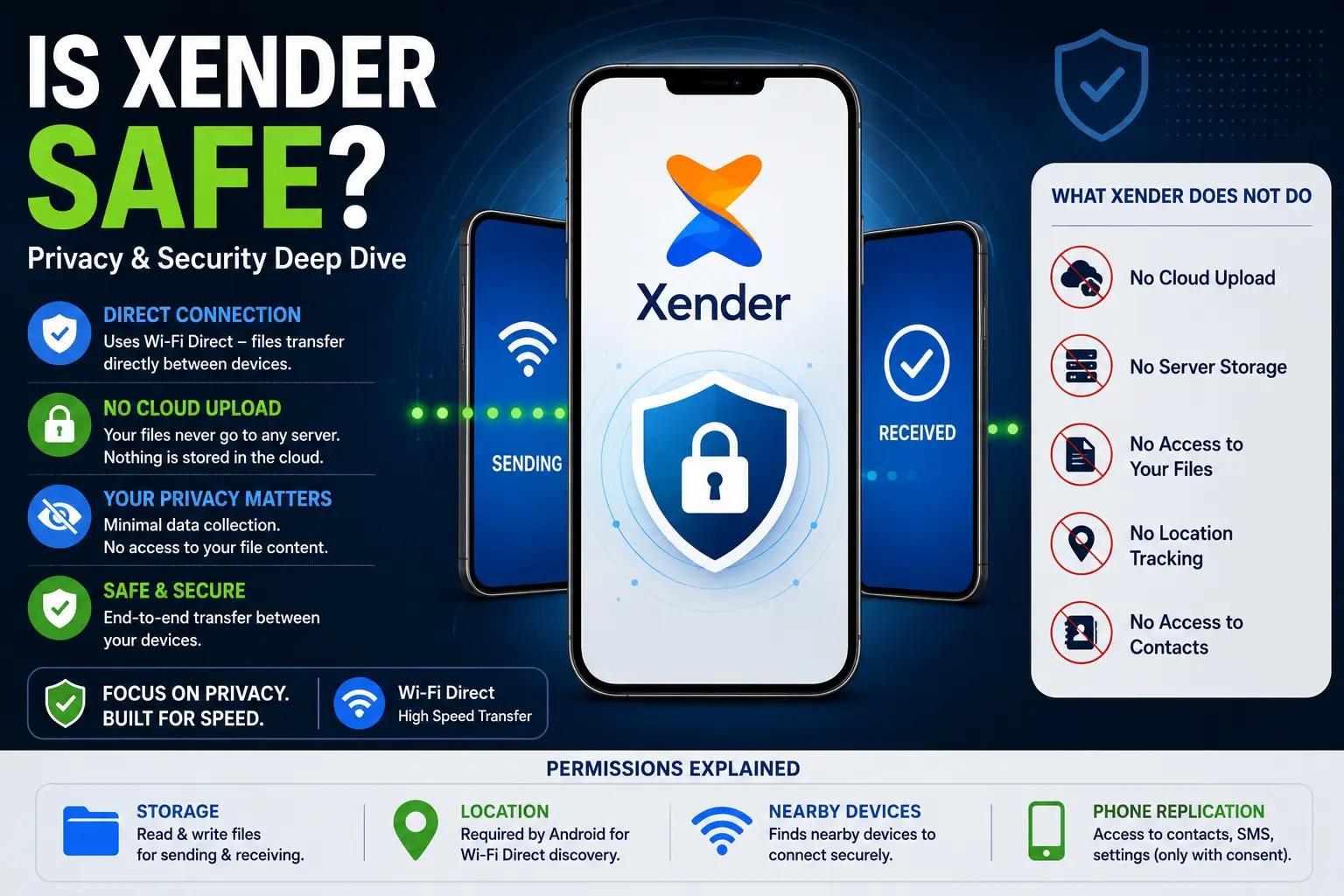
Is Xender Safe? — Privacy & Security Deep Dive
Security questions about file transfer apps are legitimate. A tool that requests access to your storage, location, and local network — and moves files between devices — deserves scrutiny before you install it. This article examines Xender’s security from the ground up: the architecture that determines what is and is not possible from a privacy standpoint, what each permission actually does, what data Xender collects, where the real risks exist, and how it compares to cloud-based alternatives on privacy grounds.
The answer is not simply “yes, it’s safe” — it depends on how you use it and what your threat model is.
The Architecture Is the Starting Point
Most privacy concerns about apps relate to data leaving your device and reaching a company’s servers. To evaluate Xender’s privacy, the first question is: what does its transfer architecture actually do?
Xender, developed by Xender (HK) Limited, uses Wi-Fi Direct (IEEE 802.11) — a peer-to-peer wireless standard that creates a direct connection between two devices without routing data through any intermediary server. When you transfer a file using Xender, the data path is:
No Xender server receives the file. No cloud relay is involved. No copy is made on external infrastructure. The file moves through a local wireless connection that exists only between the two devices participating in the transfer.
This architectural fact eliminates the most common category of cloud app privacy concerns — server-side data access, storage breaches, and third-party data sharing of file content — because Xender’s infrastructure never handles your file content at all.
Does Xender upload files to its servers? No. Xender transfers files through a direct Wi-Fi Direct peer-to-peer connection between two devices. No file data reaches Xender’s servers at any point during a standard transfer. This applies to all transfer types: phone-to-phone, phone-to-PC via Web Connect, and Phone Replication. Xender (HK) Limited has no technical access to what you transfer because the files never pass through their infrastructure.
What Data Does Xender Actually Collect?
Wi-Fi Direct transfers are private by architecture — but the app itself is a different question. Apps can collect usage data, device identifiers, and behavioral analytics entirely separate from the file transfer function.
Xender’s Privacy Policy (last updated 2024) discloses the following categories of data collection:
What Xender explicitly does not collect:
- File names, types, or content of transferred files
- Contacts or call logs (unless specifically granted for Phone Replication)
- Precise GPS location (Location permission is used for Wi-Fi Direct discovery, not GPS)
- Browsing history
Does Xender collect your location? Xender requests Location permission on Android, but this is not for GPS tracking. Android mandates that any app using Wi-Fi Direct or scanning for nearby Bluetooth/Wi-Fi devices must hold Location permission — it is a platform requirement introduced in Android 6.0 (Marshmallow). Xender does not access GPS coordinates and does not log or transmit your physical location.
Where the Real Risks Are
The architectural privacy advantages of Xender’s peer-to-peer design do not eliminate all risk. Three areas warrant honest assessment.
Risk 1 — Modified APK Files
This is the most significant real-world risk associated with Xender. The original Xender APK from the Google Play Store, Apple App Store, or verified sources like ShareXZone.com is clean. However, numerous third-party sites distribute modified Xender APK files — often labeled “Xender Mod APK,” “Xender Pro APK,” or “Xender Premium APK” — that contain altered code.
These modified builds have included:
- Additional permissions not in the original app (read call logs, read SMS, access camera)
- Hidden adware that displays ads through system-level overlays
- Spyware components that report device activity to remote servers
- Modified file transfer functions that create copies of transferred files in hidden directories
The original Xender APK does not contain these. The risk comes entirely from downloading unofficial builds.
Risk 2 — Public Wi-Fi Networks
Xender Web Connect — the browser-based PC connection at web.xender.com — creates a local HTTP server on your phone. The connection uses HTTP (not HTTPS) because it operates on the local network rather than the internet. On a private home or office network, this presents no meaningful risk.
On a public Wi-Fi network (coffee shop, airport, hotel), other devices on the same network could theoretically intercept the Web Connect session. The HTTP rather than HTTPS local connection means data in transit on the local network is not encrypted.
Risk 3 — In-App Advertising SDKs
Xender’s free version includes advertisements served through third-party ad networks. Ad SDKs — including Google AdMob — collect their own data set: advertising ID, general location from IP address, ad interaction patterns, and device characteristics. This data collection happens within the app regardless of whether you are actively transferring files.
This is standard for free ad-supported apps and is disclosed in Xender’s privacy policy. Users who consider advertising data collection unacceptable have no paid Xender tier to upgrade to — the app has no premium version. The alternative is using Xender without an internet connection, which prevents ad SDK network calls from completing.
No End-to-End Encryption — What This Means in Practice
Xender does not implement end-to-end encryption (E2EE) on its Wi-Fi Direct transfers. This is worth clarifying because it is frequently cited as a security limitation without context.
E2EE is primarily meaningful when data travels through infrastructure controlled by a third party — a server, a relay, a cloud service. It protects against the service provider reading your content. Since Xender’s transfers never touch any server, E2EE addresses a threat that does not exist in Xender’s architecture.
The relevant question for Xender is wireless interception — can someone intercept the Wi-Fi Direct transfer between two nearby devices? Wi-Fi Direct connections are not encrypted by default at the transport layer, meaning a sophisticated attacker on the same physical network who could intercept the Wi-Fi Direct signal could theoretically read the data in transit.
In practice, this requires physical proximity, specialized equipment, and active effort — it is not a realistic threat for casual file transfers between trusted devices in private environments. For transfers involving confidential legal, medical, or financial documents in environments where physical security cannot be guaranteed, dedicated encrypted transfer tools like Send Anywhere (which uses AES-256 encryption) are more appropriate.
Xender vs Cloud Apps — Privacy Comparison
| Privacy Factor | Xender | Google Drive | WeTransfer | Send Anywhere |
|---|---|---|---|---|
| Files stored on external server | No | Yes | Yes (3 days) | Yes (48 hours) |
| File content accessible to company | No | Google scans | WeTransfer stores | Encrypted (no access) |
| Transfer encryption | None (local only) | TLS in transit | TLS in transit | AES-256 E2EE |
| Data collection | Usage + ads | Extensive | Moderate | Moderate |
| File expiry risk | None | None (until deleted) | 3 days free | 48 hours free |
| Regulatory jurisdiction | Hong Kong | USA | Netherlands (Bending Spoons/Italy) | South Korea |
| Account required | No | Yes | No (free) | No |
| AI training risk | No | Google ToS applies | Past controversy (reversed) | No |
On the question of file content privacy, Xender’s local-only architecture outperforms every cloud alternative — because nothing is uploaded, nothing can be accessed, stored, scanned, or leaked from a server. The trade-off is the lack of encryption on the local connection.
Is Xender Safe for Children?
Xender does not contain age-gated content in its core file transfer functionality. The app is rated Everyone on the Google Play Store. The in-app content feed — which shows trending videos and entertainment content — may display content not suitable for young children, but this section is optional and separate from the file transfer function.
Parental guidance is appropriate for children using any app with advertising. Xender’s ad content is contextual and generally benign, but ad targeting can vary by region and network.
Security Verification — How to Check Your Xender APK
After installing Xender from any source, you can verify it has not been modified:
Method 1 — Google Play Protect:
Settings → Google → Security → Google Play Protect → Scan. Play Protect checks installed apps against Google’s malware database, including known modified APK signatures.
Method 2 — Check Permissions:
Settings → Apps → Xender → Permissions. The legitimate Xender app requests: Storage, Location, Nearby Devices (Android 12+). If you see permissions like Read Call Logs, Camera, Read SMS, or Record Audio that you did not explicitly grant during Phone Replication — the APK may be modified.
Method 3 — Check APK Signature:
Use a tool like Package Name Inspector or APK Analyzer in Android Studio to verify the APK signing certificate matches Xender (HK) Limited’s signature. This is a technical step but definitively confirms whether an APK is the genuine Xender build.
Yes — when downloaded from the Google Play Store, Apple App Store, or a verified source. The official Xender app does not upload your files to any server, does not access your location for tracking, and does not collect file content. The risk comes from modified APK files from unverified sources, which may contain additional hidden permissions or spyware.
Xender collects device identifiers (Advertising ID), usage analytics (anonymized feature usage), and advertising data through third-party ad SDKs. It does not collect file content, file names, GPS location, contacts (outside Phone Replication), or browsing history. Full disclosure is in Xender’s Privacy Policy on the Xender (HK) Limited website.
For file content privacy, yes. Xender’s peer-to-peer architecture means files never reach any server — Google Drive stores files on Google’s infrastructure where Google’s ToS applies. For encrypted transfer security, Google Drive uses TLS encryption in transit, which Xender’s local transfers do not. Both are appropriate for different use cases.
Android requires Location permission for any app that uses Wi-Fi Direct device discovery — this is a platform policy introduced in Android 6.0, not a Xender data collection choice. Xender uses this permission to find nearby devices, not to access GPS coordinates. It does not request background location access.
Direct phone-to-phone transfers are safe on public Wi-Fi because Wi-Fi Direct creates a dedicated point-to-point connection bypassing the shared network. Xender Web Connect (browser-based PC connection) uses HTTP on the local network, which is less secure on public Wi-Fi. Avoid Web Connect for sensitive files on public networks.
Modified APK files from unofficial sources. The original Xender app is clean and architecturally private. Modified “Mod APK” or “Pro APK” versions distributed on unofficial sites frequently contain hidden permissions, adware, or spyware not present in the original. Always download from the Play Store, App Store, or ShareXZone.com.
Final Conclusion
Xender’s security profile is shaped more by its architecture than by its policies. Peer-to-peer Wi-Fi Direct transfers eliminate the most common cloud app privacy risks — server-side data access, storage breaches, third-party file exposure — because the files never leave the local connection between two devices.
The genuine risks are specific: modified APK files from unofficial sources, Web Connect on public Wi-Fi networks for sensitive documents, and advertising SDK data collection standard to free apps. All three are manageable — download only from verified sources, avoid Web Connect on public networks for confidential files, and understand that the free app includes ad-based data collection.
For everyday file sharing between trusted devices — photos, videos, music, documents — Xender’s privacy posture is stronger than cloud alternatives that store your files on external servers. For highly sensitive documents requiring encrypted transfer, a dedicated E2EE tool like Send Anywhere is more appropriate regardless of network conditions.