
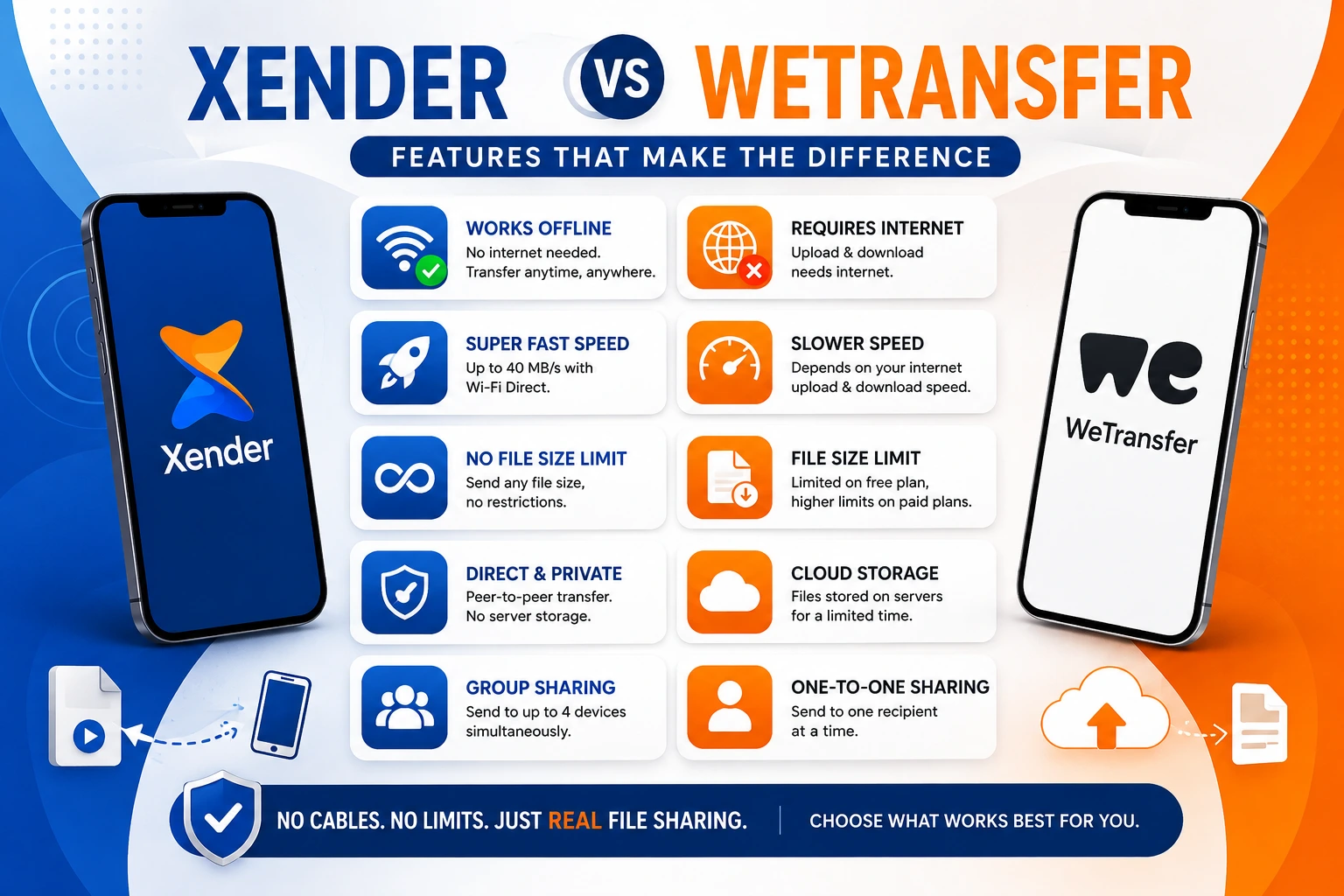
Xender vs WeTransfer — Which File Sharing Tool Actually Fits Your Needs in 2026?
These two apps share one sentence of overlap: both move large files between people. Everything else about them is different — the technology, the use case, the cost structure, and the situations in which each works.
WeTransfer
WeTransfer, founded in 2009 in Amsterdam by Nalden, Bas Beerens, and Rinke Visser and acquired in July 2024 by the Italian company Bending Spoons, is a cloud-based file-delivery service. You upload; the recipient downloads from a link. The entire transaction goes through WeTransfer’s servers.
Xender
Xender, developed by Xender (HK) Limited and launched in 2013, creates a direct Wi-Fi Direct (IEEE 802.11) connection between two devices. Nothing is uploaded. Nothing expires. Nothing goes through any server at all.
Choosing between them is not about which app is better in general. It is about which problem you are actually trying to solve. This comparison lays out both — clearly, without padding.
The Core Difference — Cloud vs Peer-to-Peer
This single distinction drives every other difference in this comparison.
☁ WeTransfer
WeTransfer works like an email attachment but for large files. You upload the file to WeTransfer’s servers. WeTransfer sends the recipient a download link. They click the link and download from WeTransfer’s servers. Your file is stored on WeTransfer’s infrastructure for a set period, then deleted.
⚡ Xender
Xender works like a cable — but wireless. Your phone and the recipient’s phone connect directly to each other. The file moves from one device’s storage to the other’s. No server receives it, stores it, or delivers it. The two devices are the entire infrastructure.
This is not a minor technical footnote. It determines:
WeTransfer 2026 — What It Offers Now
WeTransfer Free Plan — 2026 Limits
WeTransfer went through significant changes following the Bending Spoons acquisition in July 2024. Understanding the current 2026 state is important because many articles still describe the old free plan.
WeTransfer’s free plan in 2026 allows sending and receiving up to 3 GB per month across a maximum of 10 transfers, with each transfer capped at 3 GB and files expiring after 3 days. The free plan is for individual, non-commercial use only.
Two additional changes that affected users in 2025: a July 2025 Terms of Service update introduced language about using uploaded files for AI training — later rolled back after user pushback — and WeTransfer discontinued its Reviews and Portals features in December 2025.
WeTransfer Paid Plans — 2026 Pricing
WeTransfer’s current plans as of July 2026: Free plan, Starter at US$10/month, and Ultimate at US$25/month. Ultimate removes transfer size limits and allows unlimited transfers per month.
| Plan | Price | Transfer Limit | Monthly Transfers | Expiry |
|---|---|---|---|---|
| Free | $0 | 3 GB per transfer | 10 transfers / 3 GB total | 3 days |
| Starter | $10/month | 300 GB per transfer | 10 transfers | 3 days |
| Ultimate | $25/month | Unlimited (up to 1 TB) | Unlimited | No expiry |
| Teams | $25/user/month | Unlimited | Unlimited | No expiry |
The free plan is for individual, non-commercial use only — meaning freelancers delivering work to clients technically fall outside the permitted use case at the free tier.
Speed Comparison — Internet vs Wi-Fi Direct
WeTransfer Speed
WeTransfer transfer speed depends on two internet connections: the sender’s upload speed and the recipient’s download speed. On a standard 50 Mbps broadband connection, WeTransfer delivers approximately 5–6 MB/s upload throughput. On mobile data, speeds depend on network quality and congestion.
For a 1GB file: approximately 3 minutes upload time on good broadband, plus download time on the recipient’s end.
For a 3GB file (WeTransfer’s free cap): approximately 9 minutes upload, plus download.
These figures assume no throttling, no network congestion, and a stable connection — conditions that are not guaranteed in practice.
Xender Speed
Xender transfers at speeds up to 40 MB/s on 5 GHz Wi-Fi Direct (802.11ac). On 2.4 GHz, speeds land between 8–15 MB/s.
For a 1GB file: approximately 25 seconds on 5 GHz.
For a 3GB file: approximately 75 seconds on 5 GHz.
| File Size | WeTransfer (50 Mbps) | Xender (5 GHz) |
|---|---|---|
| 500 MB | ~1.5 minutes | ~13 seconds |
| 1 GB | ~3 minutes | ~25 seconds |
| 3 GB | ~9 minutes | ~75 seconds |
| 10 GB | Not possible (free) | ~4 minutes |
| 50 GB | Not possible (free) | ~22 minutes |
Speed Verdict
Xender is 6–8 times faster than WeTransfer on comparable connections for the same file size. The gap widens further for files above 3GB, where WeTransfer requires a paid plan but Xender has no ceiling.
File Size and Transfer Limits
WeTransfer
WeTransfer free: 3 GB per transfer, maximum 10 transfers per month, 3 GB total monthly data. Users mention frustrations with the seven-day expiration on free transfers — now reduced to 3 days in the 2026 plan revision.
WeTransfer Ultimate: Up to 1 TB per transfer, unlimited transfers. At $25/month, this is $300/year for unlimited file delivery.
Xender
Xender: No file size limit at any tier. No transfer count limit. No monthly data cap. No expiry — files do not expire because they are never stored on any server. A 50GB video archive and a 50KB document transfer identically.
Practical Difference
For anyone who regularly moves files larger than 3GB — RAW photo archives, 4K video exports, large project folders, full app backups — WeTransfer’s free plan hits its ceiling quickly. Xender has no ceiling to hit.
Does Xender Work Without Internet? WeTransfer Cannot.
Xender
Xender: Transfers files completely offline through Wi-Fi Direct. No internet connection, no mobile data, no router required. Works in airplane mode (with Wi-Fi manually re-enabled), in areas with no signal, and on devices with no SIM card.
WeTransfer
WeTransfer: Requires internet for every function. Upload, link generation, download, expiry management — every step routes through WeTransfer’s servers. Without internet on either end, WeTransfer cannot operate at all.
This is the most significant practical difference for users in:
Who Receives the File — App vs Link
WeTransfer
WeTransfer: The recipient receives a download link by email or through a shareable URL. They do not need WeTransfer installed. They open the link in any browser and download the file. This is WeTransfer’s biggest practical advantage — zero friction for the recipient.
Xender
Xender: The recipient needs Xender installed on their device. Both devices must be physically nearby (within 25–30 meters). The transfer happens directly between the two devices — no link, no browser, no email.
When WeTransfer’s approach wins
The recipient is geographically remote — different city, different country. They do not have Xender installed and are not nearby. You need to send files to a client, collaborator, or team member who is somewhere else.
When Xender’s approach wins
The recipient is physically nearby. You are both in the same room, office, or building. You do not want your files stored on a third-party server. You need the transfer to complete in seconds rather than minutes.
File Expiry — WeTransfer’s Hidden Friction
WeTransfer
WeTransfer’s free plan files expire after 3 days. The Starter plan also carries a 3-day expiry. Only the Ultimate plan at $25/month removes expiry entirely.
This creates a specific workflow problem: if you send a file on Friday afternoon and the recipient is traveling until Tuesday, the link is dead before they open it. The sender must resend, consuming another transfer from their monthly quota.
Xender
Xender has no expiry concept. Files transferred via Xender are saved directly to the receiving device’s storage. Once the transfer completes, the file is on the device permanently — no link, no countdown, no resend required. Learn more about Xender for PC.
Privacy and File Security
WeTransfer
WeTransfer: Files are uploaded to WeTransfer’s servers and stored there until expiry. WeTransfer uses SSL/TLS encryption for transfers in transit and encrypts files at rest. However, the files are physically stored on infrastructure controlled by Bending Spoons — the Italian company that acquired WeTransfer in 2024. The 2025 Terms of Service controversy around AI training use of uploaded files — later reversed — illustrated that server-hosted files carry policy risk that locally transferred files do not.
Xender
Xender: Files transfer through a direct local peer-to-peer Wi-Fi Direct connection. No file data reaches any external server. No third party — including Xender (HK) Limited — ever has access to what is transferred. The privacy model is structurally simpler: if the file never leaves the local connection between two devices, it cannot be exposed through server breaches, policy changes, or acquisition decisions.
Platform and Device Support
| Platform | Xender | WeTransfer |
|---|---|---|
| Android | ✅ Full app | ✅ Browser / app |
| iOS (iPhone/iPad) | ✅ Full app | ✅ Browser / app |
| Windows PC | ✅ Web Connect | ✅ Browser |
| macOS | ✅ Web Connect | ✅ Browser |
| Linux | ✅ Web Connect | ✅ Browser |
| No app needed on receiver | ❌ Xender required | ✅ Browser only |
| Works offline | ✅ | ❌ |
| Account required | No | No (free), Yes (paid) |
When to Use WeTransfer vs Xender
Use WeTransfer When
- The recipient is in a different location — a different room is fine for Xender, but a different city requires WeTransfer or a similar cloud service. WeTransfer’s link-based delivery is built for remote sharing.
- The recipient will not install any app. Clients, collaborators, or occasional recipients who receive files infrequently may prefer a browser download link over installing software.
- You need download tracking. WeTransfer notifies you when the recipient downloads the file — a useful feature for client deliveries where confirmation of receipt matters.
- Files are under 3GB, and the 3-day expiry fits your workflow. For occasional creative professionals sending renders, proofs, or deliverables to clients on short timelines, the free plan covers the use case.
- You need password protection on a shareable link. WeTransfer’s paid plans allow password-protecting download links — useful for confidential client deliveries.
Use Xender When
- Both devices are physically nearby — same room, same office, same building. This is where Xender’s speed advantage is fully realized.
- No internet is available or reliable. Traveling, rural areas, areas with expensive mobile data, or environments where upload bandwidth is restricted all favor Xender’s offline architecture.
- Files are larger than 3GB. WeTransfer’s free plan cannot handle this. Xender handles any file size at the same speed regardless of size.
- Privacy matters. Files that should not be stored on external servers — sensitive documents, personal data, confidential business files — should not go through cloud delivery services. Xender’s local transfer keeps them off all external infrastructure.
- Speed is the priority. A 1GB file in 25 seconds versus 3 minutes is a meaningful difference for daily workflows involving large media files.
- You are switching phones or sharing files with multiple people at once. WeTransfer has no device migration feature. Xender’s Phone Replication and Group Sharing have no WeTransfer equivalent.
Full Feature Comparison Table
| Feature | Xender | WeTransfer Free | WeTransfer Ultimate |
|---|---|---|---|
| Transfer Speed | Up to 40 MB/s | ~5–6 MB/s | ~5–6 MB/s |
| File Size Limit | None | 3 GB | Up to 1 TB |
| Monthly Transfer Cap | None | 10 transfers / 3 GB | Unlimited |
| File Expiry | None | 3 days | No expiry |
| Internet Required | No | Yes | Yes |
| Offline Transfer | ✅ | ❌ | ❌ |
| Server Storage | No — local only | Yes | Yes |
| App on Receiver | Required | Not required | Not required |
| Cross-Platform | Android, iOS, Win, Mac | All browsers | All browsers |
| Remote Transfer | ❌ Same network | ✅ Anywhere | ✅ Anywhere |
| Phone Replication | ✅ | ❌ | ❌ |
| Group Sharing | ✅ 4 devices | ❌ | ❌ |
| Download Notifications | ❌ | ✅ | ✅ |
| Password Protection | ❌ | ❌ | ✅ |
| Price | Free | Free | $25/month |
| Account Required | No | No | Yes |
| Commercial Use (free) | Yes | ❌ Non-commercial only | Yes |
Frequently Asked Questions
Q1: What is the main difference between Xender and WeTransfer?
Q2: Is Xender faster than WeTransfer?
Q3: Does Xender work without internet as WeTransfer requires?
Q4: What is WeTransfer’s free plan limit in 2026?
Q5: Can Xender replace WeTransfer for sending files to clients?
Q6: Does WeTransfer store your files on its servers?
Q7: Is Xender free compared to WeTransfer?
Q8: What happens to WeTransfer files after 3 days?
Q9: Can WeTransfer send files larger than 3GB for free?
Q10: Which is better for photographers and videographers — Xender or WeTransfer?
Final Conclusion
Xender and WeTransfer solve different problems — and the clearest way to choose between them is to answer one question: is the person receiving the file in the same room, or somewhere else?
If they are nearby — Xender transfers the file in seconds, at no cost, with no size limit, no expiry, and no server storing your data. A 3GB file that WeTransfer’s free plan cannot handle and its paid plan charges $10/month to send takes 75 seconds over Xender at zero cost.
If they are remote — WeTransfer’s link-based delivery is the right tool. Xender requires physical proximity. WeTransfer’s 3-day free expiry is worth knowing upfront, and the non-commercial restriction on the free plan matters for freelancers and agencies. But for getting a file to someone in a different city, WeTransfer’s model works and Xender’s model does not apply.
The users who benefit most from understanding both are creative professionals who move large files regularly. WeTransfer for client delivery. Xender for internal transfers between their own devices, between team members in the same office, and for any scenario where a 3 GB limit or a $25/month subscription would otherwise be the friction standing between them and a completed transfer.