
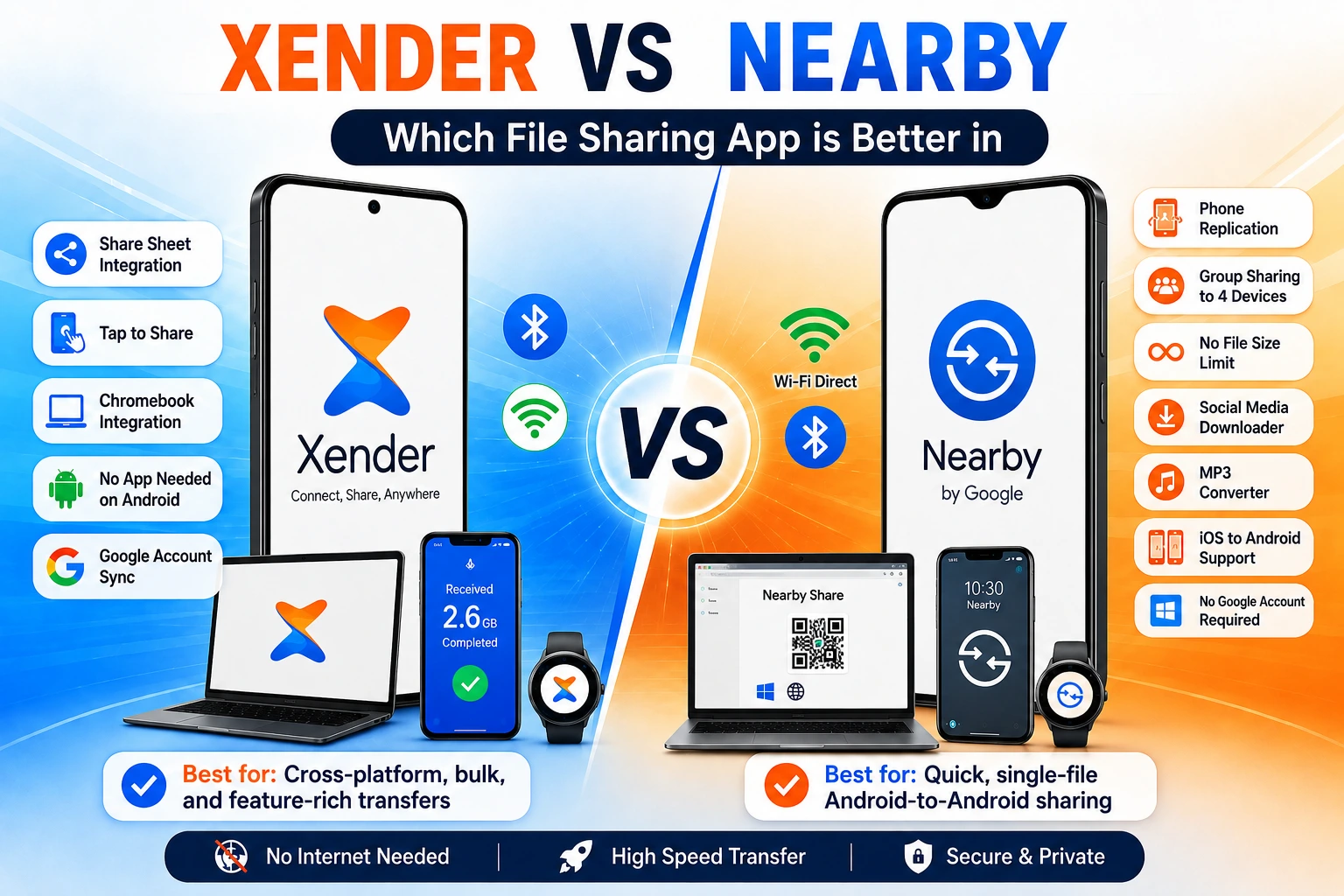
Xender vs Nearby Share (Quick Share) — Which One Should You Use in 2026?
Two apps. Both free. Both offline. Both built for Android. On paper, they look similar. In practice, they make different trade-offs — and those trade-offs matter depending on whether you share files mostly within Android, or regularly cross into iPhone and Windows territory.
Quick Share — Google’s built-in file transfer tool, formerly called Nearby Share — got a significant upgrade in 2026 that changed the conversation. It now sends files directly to iPhones and Macs on select Android devices. That one change makes this comparison worth revisiting from scratch rather than repeating the standard points from a year ago.
This article covers what each tool actually does in 2026, where the gaps remain, and which one best handles your specific situation.
What Each Tool Is — No Filler
Quick Share (formerly Nearby Share)
Quick Share is Google’s native file transfer system for Android, developed collaboratively by Google and Samsung and distributed as a standalone app through the Google Play Store since early 2026 — a shift from its previous form as a built-in system component. It runs on Android 6 and above, uses Bluetooth Low Energy for device discovery and Wi-Fi Direct for actual transfers, and is built into the Android share sheet so it appears alongside WhatsApp, Gmail, and every other sharing option when you tap the share button on any file.
As of June 2026, Quick Share AirDrop compatibility has expanded to include Samsung Galaxy S25, S24 series, Galaxy Z Fold and Flip devices, OnePlus 15, Xiaomi 17T Pro, Vivo X300 series, and Honor Magic V6.
Xender
Xender, developed by Xender (HK) Limited and first launched in 2013, operates as a standalone app across Android, iOS, Windows, and macOS. It uses Wi-Fi Direct (IEEE 802.11) for phone-to-phone transfers and a browser-based system called Xender Web Connect — accessible at web.xender.com — for phone-to-PC transfers.
Unlike Quick Share, it also works completely outside the Android ecosystem — on iPhones and Windows machines without any dependency on Google infrastructure.
Platform Support — What Each Tool Covers in 2026
This is where the comparison has shifted most dramatically in 2026 because Quick Share’s AirDrop compatibility changed its reach.
| Transfer Combination | Xender | Quick Share (2026) |
|---|---|---|
| Android → Android | ✅ | ✅ Built-in |
| Android → Chromebook | ✅ | ✅ Built-in |
| Android → Windows PC | ✅ Web Connect | ✅ Quick Share for Windows app |
| Android → iPhone | ✅ | ✅ Select devices only* |
| Android → Mac | ✅ Web Connect | ✅ Select devices only* |
| iPhone → Android | ✅ | ⚠️ Limited |
| iPhone → iPhone | ✅ | ❌ |
| iPhone → Windows PC | ✅ Web Connect | ❌ |
| iPhone → Mac | ✅ Web Connect | ❌ |
*Quick Share’s AirDrop compatibility works on Pixel 10 series, Samsung Galaxy S24/S25, and a growing list of flagships. For Android phones that do not support direct AirDrop compatibility, Quick Share offers QR code-based cloud sharing as an alternative way to share with iPhones and other unsupported devices.
Quick Share’s iPhone compatibility in 2026 works on specific flagship Android phones and requires the iPhone to have AirDrop open and set to accept. Xender’s Android-to-iPhone transfer works on any Android phone running Android 5.0 or above — no flagship requirement, no AirDrop dependency on the iPhone side.
Transfer Speed — Actual Numbers
Both tools use Wi-Fi Direct as the transfer layer, so their theoretical ceiling is the same. The difference is in what conditions they reach that ceiling.
Quick Share Speed
Quick Share uses Wi-Fi Direct on 2.4 GHz and 5 GHz bands and achieves speeds that vary significantly by Android version and device hardware. On flagship devices with Wi-Fi 6 (802.11ax) support, Quick Share reaches 15–30 MB/s in real-world Android-to-Android transfers. On mid-range devices on 2.4 GHz networks, speeds are closer to 5–10 MB/s. Quick Share’s deep OS integration means it initializes connections faster than third-party apps — the handshake takes seconds.
Xender Speed
Xender sustains up to 40 MB/s on Android-to-Android transfers on 5 GHz Wi-Fi. On 2.4 GHz networks, speeds typically land between 8–15 MB/s. For cross-platform transfers to iPhone, speeds reach 15–25 MB/s. Xender Web Connect to a PC or Mac depends on local network quality — typically 20–35 MB/s on 5 GHz.
| Scenario | Xender | Quick Share |
|---|---|---|
| Android → Android (5 GHz) | Up to 40 MB/s | 15–30 MB/s |
| Android → Android (2.4 GHz) | 8–15 MB/s | 5–10 MB/s |
| Android → iPhone | 15–25 MB/s | Varies (AirDrop dependent) |
| Android → Windows PC | 20–35 MB/s | 10–20 MB/s |
| 1GB file transfer time (5 GHz) | ~25 seconds | ~40–60 seconds |
Speed Verdict
Xender moves files faster in raw throughput. Quick Share’s advantage is in convenience — it appears in the share sheet without opening a separate app.
How Each Tool Connects to iPhone
This is the comparison most people searching for this topic actually care about in 2026.
How Xender Connects to iPhone
Xender’s Android-to-iPhone transfer works differently — and on any Android phone. The Android device creates a local Wi-Fi hotspot, the iPhone connects to that hotspot through Wi-Fi settings, and files transfer through a direct peer-to-peer connection. The iPhone user needs Xender installed.
The trade-off: Xender requires the iPhone user to have the app installed and to connect to a hotspot — extra steps compared to Quick Share’s AirDrop approach on supported devices. The advantage: it works on every Android phone, not just flagships, and does not depend on AirDrop being discoverable.
Windows PC Support — A Real Difference
Windows support is one of the biggest practical differences between the two tools. While both allow Android users to move files to a PC, they take completely different approaches.
Quick Share for Windows
Quick Share for Windows is a dedicated app that expands Android-to-PC file sharing to Windows computers, currently available for Windows 10 and Windows 11 64-bit systems, though availability varies by region. The app requires installation on the Windows PC, a Google account login, and Bluetooth to be enabled on both devices for discovery. Once set up, files transfer from Android to PC through the Quick Share interface on the phone’s share sheet — no browser needed.
The limitations: regional availability restrictions mean it is not accessible everywhere, requires a Google account, and Bluetooth dependency for discovery can cause pairing issues.
Xender Web Connect for Windows
Xender Web Connect on Windows uses Xender Web Connect at web.xender.com — no app installation, no account, no Bluetooth requirement. The phone generates a QR code, the PC browser scans it, and files transfer directly through the local Wi-Fi network. Works on Windows 7, 8, 10, and 11 in any region without regional restrictions.
The trade-off: requires navigating to web.xender.com in a browser each session — slightly more friction than Quick Share’s always-available share sheet integration.
Built-in vs App-Based — What This Means Practically
The difference between a built-in system feature and a dedicated file transfer app becomes obvious during everyday use.
Quick Share
Quick Share’s biggest real-world advantage is something no feature table captures cleanly: it lives in the share sheet.
Open a photo on Android. Tap Share. Quick Share appears in the list alongside WhatsApp, Gmail, and every other app. Tap it. Select the nearby device. Done. No separate app to open. No “tap Send, then tap Receive” on both devices. No additional steps.
Xender
Xender requires opening the app on both devices, one tapping Send, and one tapping Receive, selecting files within the app, and then initiating the transfer. For a single photo or document, Quick Share’s share sheet integration is genuinely faster in daily use.
For bulk transfers — 200 photos, a folder of videos, an APK, and several documents — Xender’s interface is better suited because it was built specifically for this workflow. Quick Share’s share sheet works best for single files or small selections.
Offline Operation — Where Both Stand
Both tools transfer files without internet or mobile data, but the way they discover nearby devices is different.
Bluetooth + Wi-Fi Direct
Quick Share uses Bluetooth Low Energy for device discovery — meaning Bluetooth must be enabled on both devices. The actual file transfer uses Wi-Fi Direct. If Bluetooth is off, Quick Share cannot find nearby devices even if Wi-Fi is on.
Wi-Fi Direct Only
Xender uses Wi-Fi Direct for both discovery and transfer. Bluetooth does not need to be enabled. Location permission on Android handles the discovery function that Bluetooth assists with in Quick Share.
Practical Difference
In practice: most phones have Bluetooth on by default, so this distinction rarely matters. But in specific situations — devices with Bluetooth issues, or environments where Bluetooth is administratively disabled — Xender’s Wi-Fi-only approach is more reliable.
Features Xender Has That Quick Share Does Not
Although both tools transfer files offline, Xender includes several capabilities that extend well beyond basic file sharing.
Phone Replication
Phone Replication: Clones an entire Android phone — apps with data, contacts, SMS, photos, settings — to a new device in one session. Quick Share transfers individual files; it has no equivalent to this complete device migration feature.
Group Sharing to 4 devices simultaneously
One Xender device broadcasts to up to four recipients at the same time. Quick Share sends to one device per transfer.
No file size limit, confirmed
Xender explicitly imposes no file size ceiling. Quick Share does not publish a hard limit,t but real-world large transfers above 4GB have shown inconsistency depending on Android version.
Social Media Downloader
Xender’s built-in downloader saves videos from WhatsApp Status, Instagram, Facebook, and TikTok. Quick Share has no content download function.
MP3 Converter
Audio extraction from video files within the app. No Quick Share equivalent.
iOS send capability
Xender allows an iPhone to send files to Android. Quick Share’s AirDrop compatibility is largely one-directional in 2026 — Android sending to iPhone works on select devices, but iPhone initiating to Android through Quick Share is not the intended flow.
No Google account required
Xender has zero account dependency. Quick Share’s Windows app requires a Google account.
Which One Is Right for Your Situation
Both tools are excellent — the better choice depends entirely on how and where you usually share files.
Use Quick Share when:
You are sharing a single photo, video, or document between two Android phones in the same room
The convenience of the share sheet — tap Share → select Quick Share → done — matters more than transfer speed
Both devices are Android, and neither is going anywhere near an iPhone or Windows PC
You have a compatible flagship (Galaxy S24/S25, Pixel 10) and want to send directly to an iPhone without apps
Use Xender when:
You regularly transfer files between Android and iPhone — and you want it to work on any Android phone, not just flagships
You move large batches of files — folders, video collections, bulk photo exports
You need to transfer files to a Windows PC without installing software or dealing with regional restrictions
You are switching phones and need to clone an entire device
You share the same files with multiple people at the same time
You use an iPhone yourself and need to send files to an Android device
Frequently Asked Questions
Quick Share is Google’s built-in Android file transfer tool — pre-installed, share sheet integrated, Bluetooth-assisted discovery. Xender is a standalone app that works across Android, iOS, Windows, and Mac with faster raw transfer speeds and features like Phone Replication and Group Sharing. Quick Share is more convenient for casual single-file Android-to-Android sharing. Xender is more capable for cross-platform and bulk transfers.
Yes, on select Android devices. Quick Share gained AirDrop compatibility in 2026, starting with Pixel 10 and expanding to Samsung Galaxy S24/S25, OnePlus 15, Xiaomi 17T Pro, Vivo X300, and Honor Magic V6 as of June 2026. Devices not on this list can use QR code cloud sharing as an alternative. Xender works with iPhone on any Android phone running Android 5.0 or above.
In raw throughput, yes. Xender reaches up to 40 MB/s on 5 GHz Wi-Fi Direct connections. Quick Share typically delivers 15–30 MB/s on the same network conditions. For a single small file, the difference is negligible. For large transfers — several gigabytes — Xender’s speed advantage adds up to minutes saved.
No. Quick Share transfers files through Wi-Fi Direct without internet. It does require Bluetooth for device discovery. Xender transfers without either internet or Bluetooth — only Wi-Fi needs to be enabled.
For Android-to-Android casual sharing, Quick Share’s share sheet integration makes it more convenient for everyday use. Xender is the replacement when Quick Share cannot handle the scenario — iPhone transfers on non-flagship devices, Windows PC transfers without regional restrictions, bulk transfers, or device cloning. If you also want to compare Apple’s ecosystem, see our Xender vs AirDrop guide.
Nearby Share was renamed Quick Share in early 2024 following a collaboration between Google and Samsung. The functionality expanded significantly, and the app moved from a system component to a Play Store-distributed APK in 2026, making it easier to update and deploy across more Android manufacturers.
Yes, through the Quick Share for Windows app — but it requires installation on the PC, a Google account, and is not available in all regions. Xender Web Connect works on any Windows PC in any region through a browser, with no account and no PC-side installation.
No. Both devices need Xender installed for direct transfers. Quick Share’s advantage is that it comes pre-installed on Android 6 and above — no download needed for the receiver on Android.
Final Conclusion
Xender vs Quick Share in 2026 is a closer comparison than it was two years ago — Quick Share’s AirDrop compatibility on flagship devices closed one of Xender’s most significant advantages. But it did not close all of them.
Quick Share earned its place as the default for Android-to-Android casual sharing. The share sheet integration is genuinely useful, the Tap to Share feature works well, and on flagship devices the AirDrop compatibility removes the need for a third-party app in some iPhone scenarios. For users who own one of the supported flagship phones and primarily share single files between Android devices or to their own Apple devices, Quick Share handles daily use without friction.
Xender holds its position for everything else. Any Android phone — not just flagships — can share with any iPhone through Xender. The Windows PC transfer works in every region without a Google account. Bulk transfers are faster. Phone Replication has no Quick Share equivalent. Group Sharing to four devices at once has no Quick Share equivalent.