
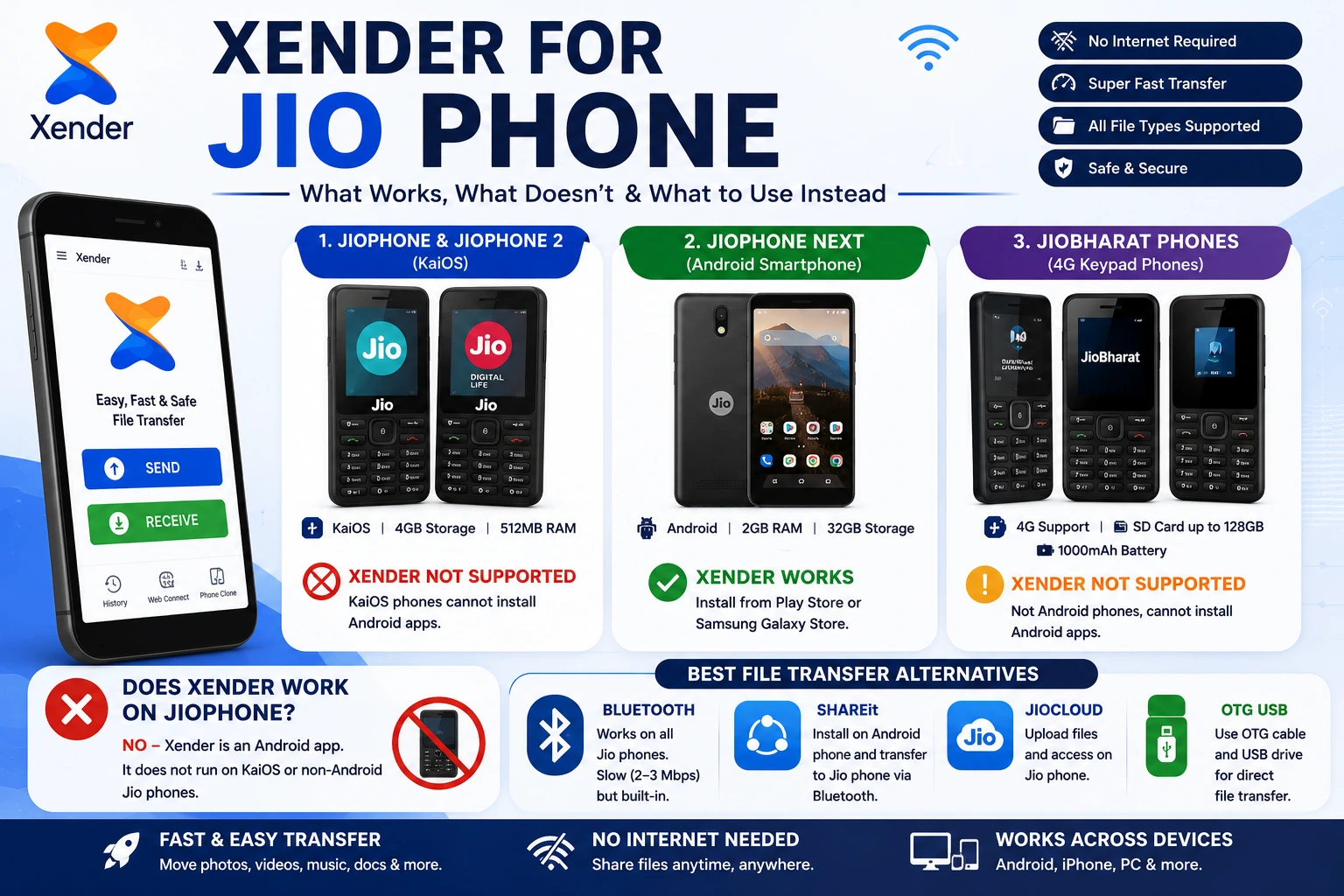
Xender for Jio Phone — What Works, What Doesn’t, and What to Use Instead (2026)
The Jio Phone Lineup — Three Completely Different Devices
Before answering whether Xender works, you need to know which Jio phone you have — because the answer is different for each one.
Original JioPhone and JioPhone 2 (KaiOS)
The original JioPhone and JioPhone 2 are keypad phones running KaiOS, not Android. Jio’s official specifications list KaiOS, 4GB internal storage and 512MB RAM for these devices. :contentReference[oaicite:1]{index=1}
They use the Jio Store for additional apps rather than the Google Play Store, so standard Android APK files cannot simply be installed on them. JioPhone 2 is the upgraded keypad version with a full QWERTY keyboard. :contentReference[oaicite:2]{index=2}
JioPhone Next (Android)
JioPhone Next is fundamentally different from the older keypad JioPhones. Jio describes it as a 4G smartphone with an optimized version of Android designed for India. :contentReference[oaicite:3]{index=3}
Its official specifications include a 5.45-inch HD+ display, 2GB RAM, 32GB internal storage and the Qualcomm QM215 processor. Because it is an Android smartphone, its app compatibility is fundamentally different from the KaiOS-based JioPhone models. :contentReference[oaicite:4]{index=4}
JioBharat Phones
JioBharat devices are another category of affordable 4G keypad phones. Jio’s official specifications list a 1.77-inch display, external microSD support up to 128GB and a 1000mAh battery. :contentReference[oaicite:5]{index=5}
They are not equivalent to Android smartphones such as JioPhone Next. Their lightweight feature-phone platform and app ecosystem mean that normal Android APK installation is not the same as it is on an Android phone.
If you have a JioPhone or JioPhone 2, you are using a KaiOS keypad phone. If you have a JioPhone Next, you have an Android smartphone. JioBharat phones are a separate 4G keypad category. This distinction is the first thing to check before deciding whether Xender APK installation is possible.
Does Xender Work on the Original JioPhone (KaiOS)?
No. Xender does not work on the original JioPhone or JioPhone 2.
Here is exactly why:
Xender is an Android application distributed as an APK file. KaiOS cannot install or run Android APK files. The two operating systems are fundamentally different — KaiOS is browser-based, not Linux-kernel Android. Even if you find a version of the Xender APK online and attempt to install it on a KaiOS JioPhone, it will not open because the device has no Android runtime to execute it.
The Jio Store — the only app store available on KaiOS JioPhones — does not list Xender. Xender (HK) Limited has not released a KaiOS version of the app.
Can you sideload Xender on JioPhone using OmniSD?
OmniSD was a workaround that allowed some third-party app installation on early KaiOS JioPhones — but Reliance Jio released a targeted OTA update in late 2019 that disabled this capability permanently. Modern JioPhone KaiOS firmware does not support any APK sideloading method. Xender cannot be installed through any currently available method on the original KaiOS JioPhone.
This is not a limitation of Xender — no major Android file transfer app works on KaiOS JioPhones. The platform simply does not support Android apps.
Compatibility note: The official JioPhone specifications identify KaiOS as its operating system, while the JioPhone 2 is also listed by Jio with KaiOS.
How to Transfer Files on the Original JioPhone (Best Alternatives)
Since Xender is unavailable, here are the methods that actually work on KaiOS JioPhones for file transfer:
Bluetooth File Transfer
KaiOS JioPhones support standard Bluetooth 4.1 file transfer. While slow — approximately 2–3 Mbps — it is the most practical built-in option for sending photos and small files between two JioPhones or between a JioPhone and an Android phone.
How to use:
- Go to Settings → Bluetooth on the JioPhone
- Enable Bluetooth and make the device discoverable
- On the Android phone, pair with the JioPhone
- Send files through the Android file manager → Share → Bluetooth
Limitation: Files above 10–15 MB transfer slowly. Folders cannot be sent as a batch.
MicroSD Card Transfer
All original JioPhones and Jio Bharat devices support microSD cards up to 128 GB. For larger file transfers, the microSD card remains the most practical method — copy files to the SD card on one device and move the card to another.
This is zero-cost, requires no internet, works with any file size, and is significantly faster than Bluetooth for large batches.
Google Files App (If Available on Your KaiOS Version)
Some later KaiOS JioPhone firmware versions included a basic Google Files app. If your JioPhone has it, it supports basic Bluetooth-assisted nearby sharing with Android devices running the Files by Google app.
WhatsApp Lite File Sharing
JioPhones running KaiOS 2.5 support WhatsApp Lite — a stripped-down version of WhatsApp. It handles documents, images, and audio sharing through WhatsApp’s internet-based transfer. This requires an active Jio data connection and compresses media files.
Not suitable for: Large videos, APK files, or any file requiring original quality preservation.
Frequently Asked Questions
The original JioPhone and JioPhone 2 run KaiOS — not Android. Xender is an Android app and cannot be installed on KaiOS devices. Xender works fully on JioPhone Next, which runs Android 11 Go Edition and supports the Google Play Store.
The most practical options are: Bluetooth for small files to nearby Android phones, MicroSD card for larger batch transfers (copy to SD card, move card to receiving device), and WhatsApp Lite for photo and document sharing over an internet connection. No major Android file transfer app, including Xender,r can run on KaiOS.
Yes. JioPhone Next runs Android 11 Go Edition and supports the Google Play Store. Install Xender from the Play Store, grant the three permissions (Storage, Location, Nearby Devices), and it works for all standard transfers — Android to Android, JioPhone Next to iPhone, and JioPhone Next to PC via Web Connect.
KaiOS is not Android. It cannot run Android APK files. Xender is distributed as an Android APK. The Jio Store on KaiOS does not list Xender, and Xender (HK) Limited has not released a KaiOS version. No sideloading method currently works on modern KaiOS JioPhones after Jio’s 2019 OTA update disabled third-party app installation.
Using Xender from the Google Play Store. JioPhone Next supports Wi-Fi 4 (802.11n), which gives Xender transfer speeds of 8–12 MB/s — significantly faster than Bluetooth at 2–3 Mbps. Install Xender on both devices, tap Send on one and Receive on the other, and transfer begins in seconds.
Based on leaked specifications showing Android 12 and a MediaTek Dimensity 700 5G processor, Xender should work fully on JioPhone 5G if it launches with those specifications. Android 12 is fully supported by Xender, and the hardware would support High Speed Mode on 5 GHz Wi-Fi.
No major dedicated file transfer app runs on KaiOS JioPhone. The platform’s app ecosystem is limited to apps specifically built for KaiOS, and no KaiOS version of Xender, SHAREit, or similar apps exists. Bluetooth transfer, MicroSD cards, and WhatsApp Lite are the practical options for KaiOS JioPhone users.
Yes. Open Xender on JioPhone Next, tap Send, select files, and tap Connect to iPhone. Xender creates a Wi-Fi Direct hotspot. On iPhone, connect to the hotspot through Settings → Wi-Fi, open Xender, and tap Receive. Transfer works without internet or mobile data.